
Generic FreeTrack Setup
This guide applies to most games that support the FreeTrack or TrackIR/NPClient compatibility protocols. If a dedicated setup guide for your game is available, please follow that guide instead.
Not sure if your game is supported?
VisApex supports hundreds of games through standard compatibility protocols. However, it is not practical to personally verify every title or every game update.
We recommend trying the VisApex Demo with the game you want to play before purchasing.
If you encounter any issues with a game that is expected to work, please contact us. We are happy to help whenever possible and continuously improve VisApex compatibility and documentation based on user feedback.
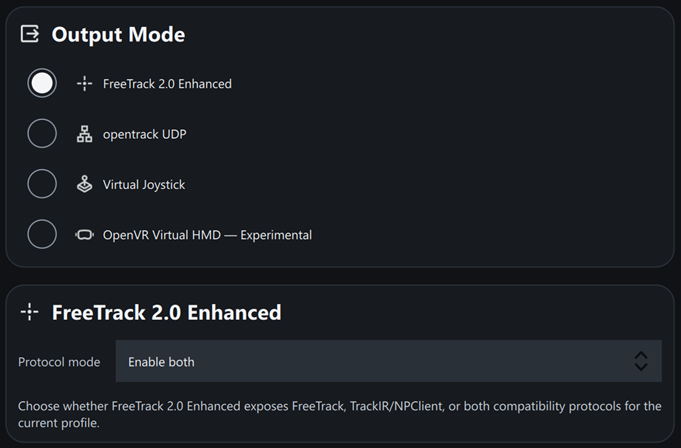
1. Select the FreeTrack Output
In VisApex, select:
- Output Mode → FreeTrack 2.0 Enhanced
2. Configure the Protocol Mode
Set Protocol Mode to:
- Enable Both (recommended)
This exposes both the FreeTrack and TrackIR/NPClient compatibility protocols simultaneously, which works with most supported games.
If the game does not detect head tracking, try one of the following instead:
- Enable TrackIR Only
- Enable FreeTrack Only
Some games support only one of these compatibility protocols.
3. Start Tracking
Click Start Tracking in VisApex and confirm that head tracking is working before launching the game.
4. Launch the Game
Launch the game normally.
Most games automatically detect the tracking interface during startup. If the game is already running, restart it after changing the Output Mode or Protocol Mode.
5. Enable Head Tracking (If Required)
Some games require TrackIR or head tracking support to be explicitly enabled in the game’s settings. If head tracking is not working, check the game’s options and enable the appropriate tracking feature before restarting the game.
Troubleshooting
- Verify that FreeTrack 2.0 Enhanced is selected as the Output Mode.
- Try changing Protocol Mode to Enable TrackIR Only or Enable FreeTrack Only.
- Make sure that VisApex is tracking your head movement before continuing.
- Restart the game after changing protocol settings.
- Check whether a dedicated setup guide for your game is available.
Trademark Notice
VisApex is an independent software application and is not affiliated with, endorsed by, sponsored by, or associated with NaturalPoint, Inc.
VisApex provides compatibility with supported games through the FreeTrack and TrackIR/NPClient compatibility protocols.
TrackIR® is a registered trademark of NaturalPoint, Inc.