
SteamVR Virtual HMD (Experimental)
Overview
The SteamVR Virtual HMD allows VisApex to provide head tracking in selected SteamVR games without requiring a physical VR headset.
VisApex presents itself to SteamVR as a virtual VR headset and supplies head tracking data to compatible OpenVR games while continuing to display the game on your monitor.
This feature was originally developed for Assetto Corsa EVO Early Access and Automobilista 2 as an alternative method of providing head tracking. It has since been extended to support additional OpenVR titles, including NoLimits 2 Roller Coaster Simulation, theBlu.
Experimental Feature
SteamVR Virtual HMD is currently an experimental feature. It is primarily intended for Assetto Corsa EVO Early Access, Automobilista 2, NoLimits 2 Roller Coaster Simulation.
Requirements
SteamVR Virtual HMD requires SteamVR.
SteamVR is available free of charge from Steam:
https://store.steampowered.com/app/250820/SteamVR
Once SteamVR is installed, VisApex can automatically communicate with it when OpenVR Virtual HMD is selected as the output protocol.
Configuration
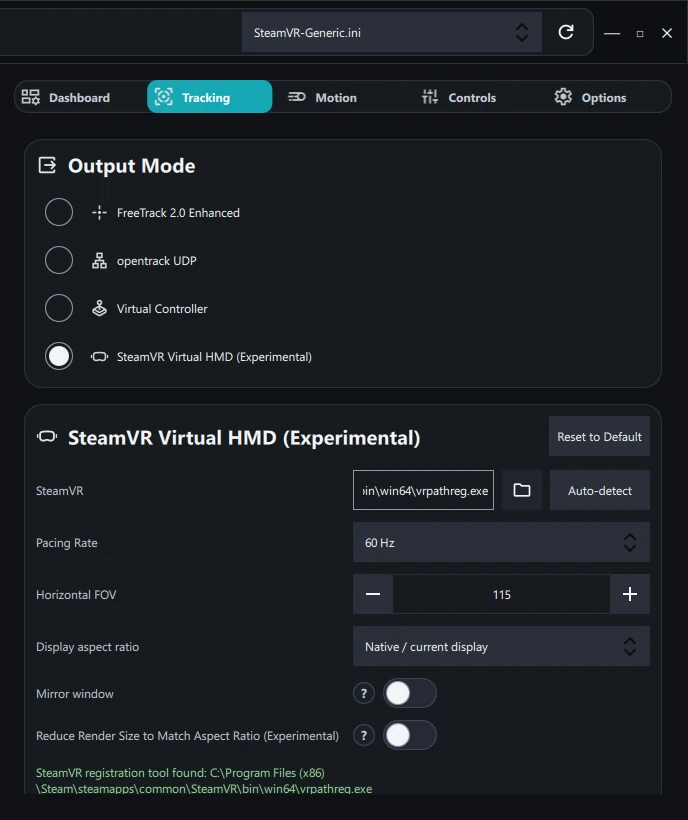
SteamVR
Specify the location of the SteamVR installation.
Normally VisApex detects SteamVR automatically. If SteamVR is installed in a custom location or cannot be detected, click the folder button to browse for vrpathreg.exe, or use Auto-detect to search again.
Pacing Rate
Sets the refresh rate reported by the virtual headset to SteamVR.
For best results, this should match your display’s refresh rate (for example, 60 Hz, 120 Hz, or 144 Hz).
Horizontal FOV
Adjusts the horizontal field of view reported by the virtual headset.
Currently supported only by Assetto Corsa EVO.
Increasing the FOV allows more of the scene to be rendered, while decreasing it reduces the visible horizontal area.
For other supported games, this setting has no effect.
Display Aspect Ratio
Changes the aspect ratio presented to compatible games.
Currently supported only by Assetto Corsa EVO.
This setting is intended for ultrawide displays or letterbox mode on a 16:9 display. Selecting an appropriate aspect ratio can improve image composition and reduce unnecessary rendering outside the visible area.
Mirror Window
Controls whether SteamVR creates a desktop mirror window.
- Assetto Corsa EVO: Keep this option enabled. The mirror window is required for proper operation.
- Automobilista 2: The mirror window may be disabled.
- NoLimits 2 Roller Coaster Simulation: The mirror window may be disabled.
Disabling the mirror window where supported can reduce desktop clutter and may slightly reduce GPU usage.
Reduce Render Size to Aspect Ratio (Experimental)
Reduces the rendering resolution to match the selected Display Aspect Ratio.
This option is primarily intended for letterbox mode.
When displaying a widescreen aspect ratio on a 16:9 monitor using black bars, VisApex can reduce the rendered image to exclude the unused letterbox area. This may improve rendering performance by reducing the number of pixels that need to be processed.
Currently supported only by Assetto Corsa EVO.
Register / Unregister Driver
Registers or unregisters the VisApex OpenVR Virtual HMD driver with SteamVR.
Normally these buttons are not required. VisApex automatically registers the driver when head tracking starts using OpenVR Virtual HMD output mode and automatically unregisters it when head tracking stops.
These controls are provided primarily for troubleshooting or advanced usage, such as manually registering the driver before launching a game or removing it from SteamVR after use.
Recommended Usage
For most users, the recommended workflow is:
- Install SteamVR.
- Select OpenVR Virtual HMD as the output protocol in VisApex.
- Start head tracking.
- Launch a supported OpenVR game.
- When you finish playing, simply stop head tracking or close VisApex. Driver registration and unregistration are handled automatically.
Manual driver registration is only necessary in exceptional situations, such as troubleshooting or verifying that SteamVR has correctly detected the VisApex Virtual HMD.
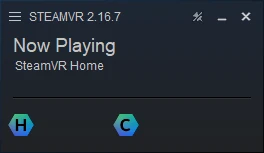
Important!!!
Close SteamVR App after you finish with SteamVR Virtual HMD. It’s cleaner to have it restart with the game.