
F1 2021 Head Tracking Setup
F1 2021 has been tested with VisApex and supports head tracking through the TrackIR/NPClient compatibility protocol.
F1 2021 requires Head Tracking with TrackIR to be enabled in-game. This setting is located under Tobii Eye Tracking, but it is only shown when the settings are accessed from within a driving session.
Compatibility with Other F1 Games
This setup has been tested and verified with F1 2021.
F1 22, F1 23, and F1 24 also support TrackIR-compatible head tracking and are expected to work with VisApex using the same or a similar setup.
F1 22 is known to use a very similar in-game setup. F1 23 and F1 24 also provide TrackIR-compatible head tracking through their Eye and Head Tracking settings, although the exact menu procedure may differ.
F1 22, F1 23, and F1 24 have not been tested with VisApex because they are no longer available for us to purchase.
Planning to use VisApex with F1 22, F1 23, or F1 24?
We recommend downloading the VisApex Demo and testing it with your game and system before purchasing the full version. The demo allows you to verify compatibility in your own environment.
Alternatively, you may want to wait until compatibility has been confirmed through community testing.
If you encounter an issue, please contact us. We will be happy to investigate the problem with you and, where possible, improve compatibility or provide additional setup instructions.
Earlier F1 titles also support TrackIR in various versions, but their in-game configuration may differ. Please refer to the VisApex compatibility list for versions that have been individually tested.
1. Create an F1 2021 Profile
In VisApex, go to:
Options → Profiles
Create a new profile for F1 2021.
This is optional, but recommended if you use VisApex with multiple games. A separate profile allows you to keep your F1-specific tracking and output settings without affecting your other game profiles.
2. Select the FreeTrack Output
In VisApex, select:
Output Mode → FreeTrack 2.0 Enhanced
3. Configure the Protocol Mode
Under FreeTrack 2.0 Enhanced, set:
Protocol Mode → Enable Both (recommended)
F1 2021 has been tested successfully with Enable Both.
If head tracking is not detected, try:
Protocol Mode → TrackIR Only
Restart F1 2021 after changing the Protocol Mode.
4. Start Tracking
Click Start Tracking in VisApex and confirm that head tracking is working.
Center your view if needed. Keep your head still and facing your normal forward position while centering.
We recommend starting VisApex tracking before launching F1 2021.
5. Launch F1 2021 and Enter a Driving Session
Launch F1 2021 normally and continue into a driving session until your car is actually on track.
This step is important because the Head Tracking with TrackIR option is only shown when the settings are accessed from within a driving session.
Important: The Tobii Eye Tracking settings menu itself is available from the F1 2021 main menu. However, Head Tracking with TrackIR does not appear there. You must first enter a driving session and access the settings from the pause menu.
6. Enable TrackIR Head Tracking
Once your car is on track:
- Pause the game.
- Open Settings.
- Select Tobii Eye Tracking.
- Set Head Tracking with TrackIR → On.
- Return to the driving session.
F1 2021 should now respond to your VisApex head movements.
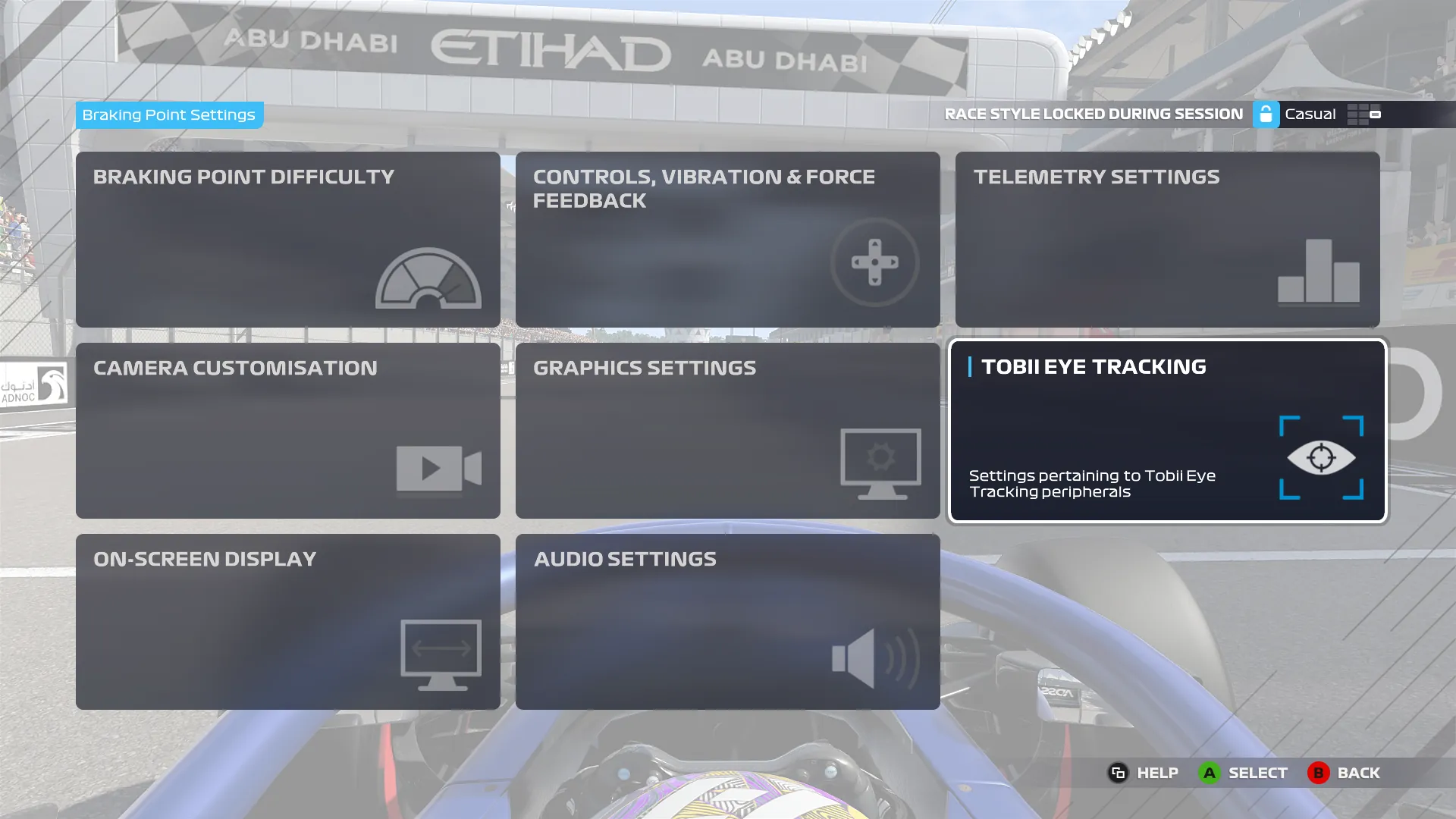
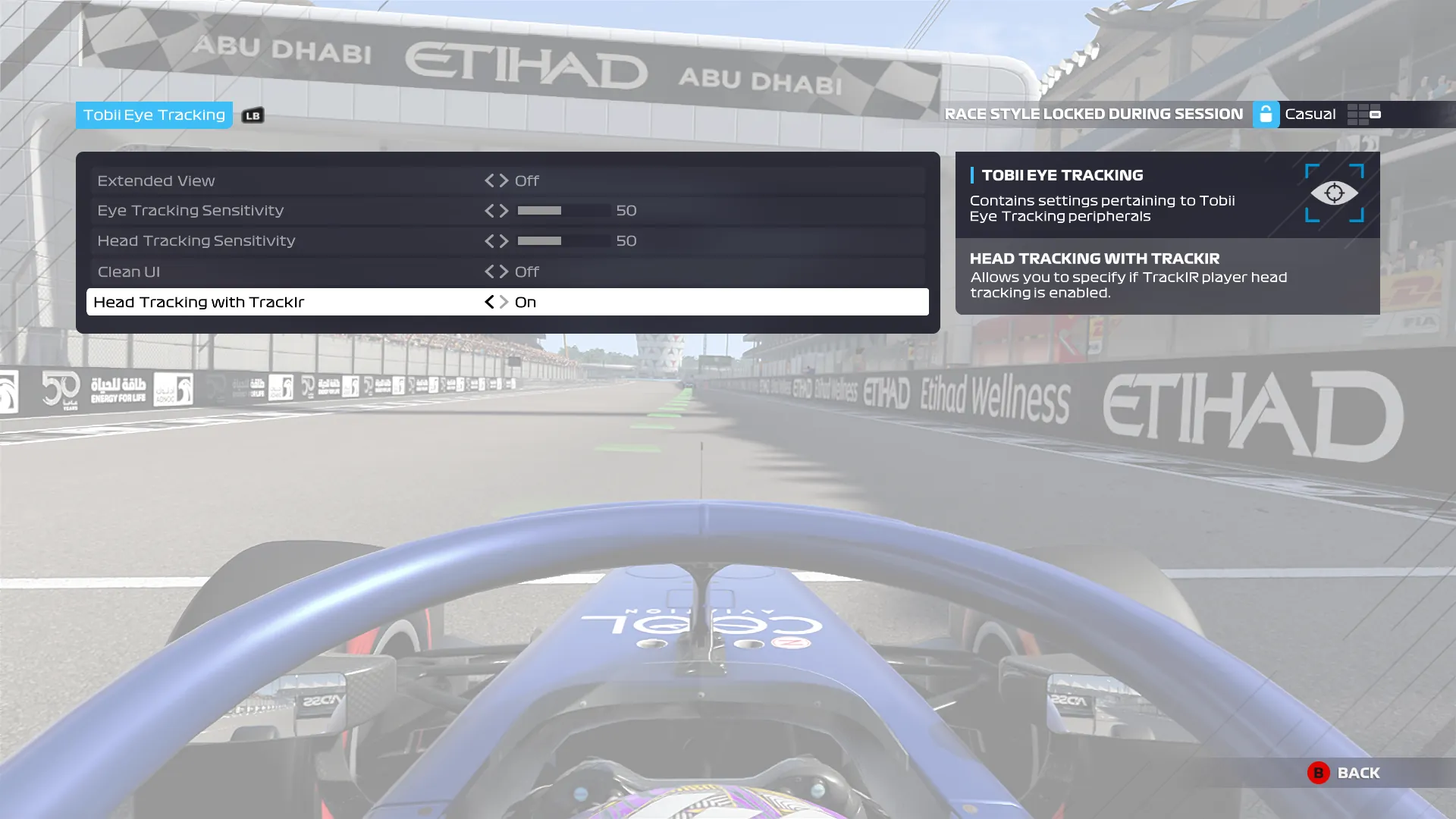
Note: If you open Tobii Eye Tracking from the main menu, you will not see the Head Tracking with TrackIR option. It only appears when the settings are opened from within a driving session.
This in-game setting normally only needs to be configured once.
Subsequent Sessions
After the initial setup:
- Start VisApex.
- Select your F1 2021 profile.
- Start VisApex head tracking.
- Launch F1 2021 normally.
Head tracking should become active when you enter a driving session.
Troubleshooting
- Verify that the correct F1 2021 profile is selected.
- Verify that FreeTrack 2.0 Enhanced is selected as the Output Mode.
- Make sure VisApex head tracking is running before launching F1 2021.
- Make sure Head Tracking with TrackIR is enabled in F1 2021.
- If you cannot find Head Tracking with TrackIR, enter a driving session, pause the game, and open Settings → Tobii Eye Tracking from there.
- If head tracking is not detected with Enable Both, try TrackIR Only and restart F1 2021.
- If F1 2021 still does not detect head tracking, close the game, start VisApex tracking first, and then restart F1 2021.
Trademark Notice
VisApex is an independent software application and is not affiliated with, endorsed by, sponsored by, or associated with NaturalPoint, Inc., Electronic Arts Inc., Codemasters, or Tobii AB.
VisApex provides compatibility with supported games through the FreeTrack and TrackIR/NPClient compatibility protocols.
TrackIR® is a registered trademark of NaturalPoint, Inc.
Tobii® is a registered trademark of Tobii AB.